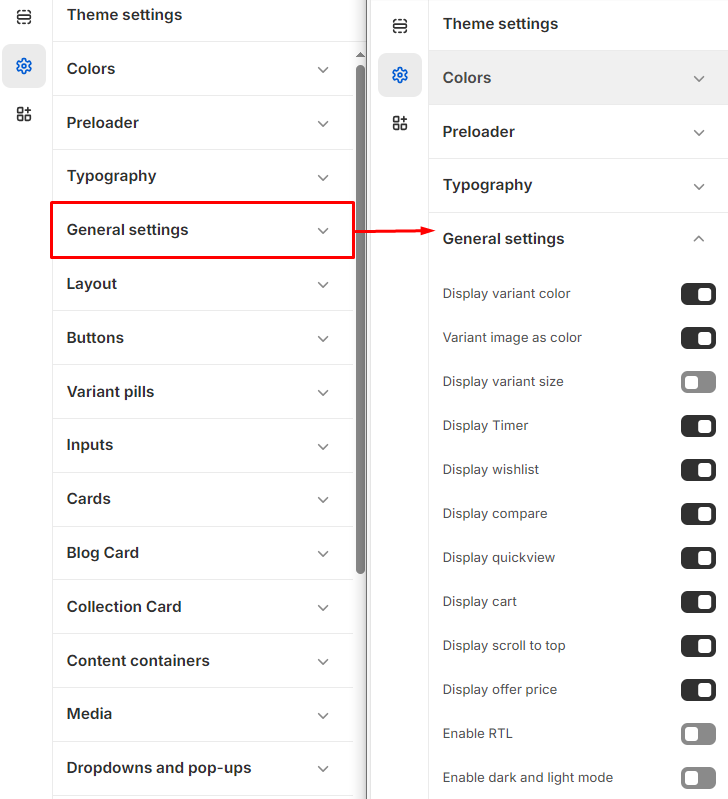
# General Settings
The General settings page allows users to customize various display options for product information and it can be applied to the following elements:'
{% hint style="success" %}
**Step 1** : From your Shopify admin, go to **Online Store > Themes.**
**Step 2** : Find the theme that you want to **Edit and Click Customize.**
**Step 3** : Click **Theme Settings.**
**Step 4 : Theme Settings > General Settings**
{% endhint %}
### Options included
* **Display Variant Color:** This option is used to showcase different color variants of the products.
* **Variant Image as Color:** To display variant image as desired colour.
* **Display Variant Size:** This option allows you to display the variant image in the selected color.
* **Display Timer:** This option allows you to enable or disable a timer for limited-time offers or sales[**(Show add metafield)**](https://venusweb.gitbook.io/faryita/product/metafield).
* **Display Wishlist:** This option allows you to display or hide the button for adding items to a [**wishlist.**](https://venusweb.gitbook.io/faryita/pages/wishlist)
* **Display Compare:**This option allows you to show or hide the button for [**comparing** ](https://venusweb.gitbook.io/faryita/pages/compare)products.
* **Display Quickview:**This option allows you to enable or disable the quick view feature for products.
* **Display Cart:** Displays or hides the shopping [**cart** ](https://venusweb.gitbook.io/faryita/theme-settings/cart)icon.
* **Display Scroll to Top:** Shows or hides a button to scroll back to the top of the page.
* **Display Offer Price:** Displays or hides the offer price (if applicable).